Win the booking. Then make it unforgettable.
Pitch with a branded page, not a PDF quote: real photographs, a route map, and two or three versions your client picks from. Their confirmations become the itinerary.
- They stay yours. Your itineraries and uploads sit in your account until you remove them. We do not sell anything to anybody.
- Two companies touch them. Anthropic reads the text to build the trip. Google supplies place details and the map. Nobody else.
- They never train an AI model. Not ours, and not Anthropic's — their API terms exclude it, and we do not build models on your content.
- You can wipe it in one click. Delete an itinerary, or your whole account and everything in it, from your dashboard. It happens immediately.
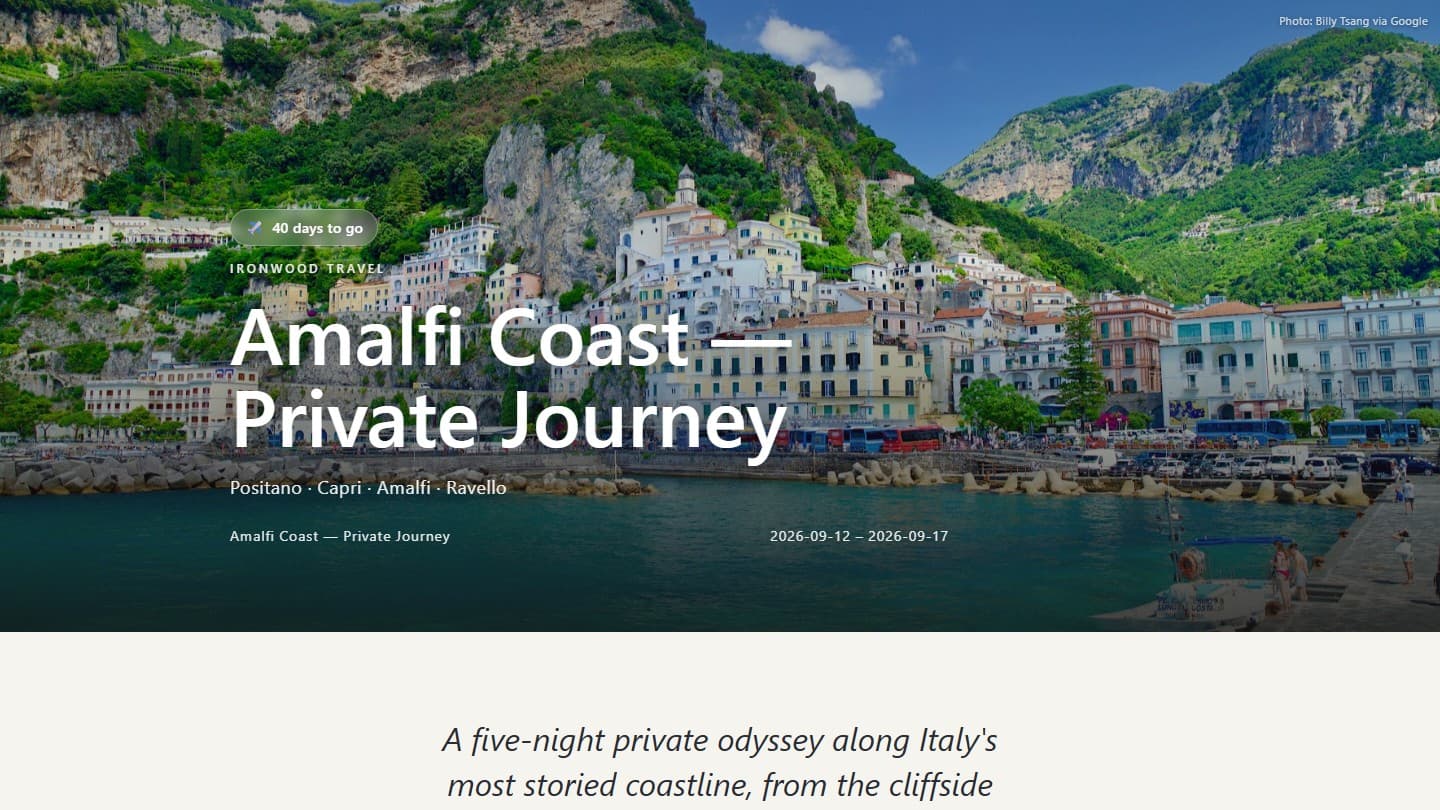
- Your own branding — your agency name at the top, not ours
- A real photograph of the destination — the actual coastline, not stock
- An editorial opening, written for the trip — written in a warm tone
- Options your client picks from
- A trip designed before it is sold
- Branded, client-ready link
This is the real thing. Scroll it.
A finished Ivory Maps itinerary, running right here — exactly what your client opens when you send them the link.

Everything from the pitch to the thank-you
The itinerary is how you win the trip, not paperwork you send once it is booked.
Options, side by side
Send two or three versions of the trip under a single link. Your client reads all of them and picks one, and you see which.
A trip designed from a brief
No documents needed. Describe what you have in mind and get a full itinerary to pitch, before anything is booked.
Real, specific photos
Actual images of the exact landmarks, restaurants and towns on the trip, found one stop at a time.
A route map
Every stop plotted in order on a clean map, so the whole journey reads at a glance.
Written like a magazine
Every day gets warm, specific prose in a high-end travel voice, written for this trip and these travellers.
Opens beautifully on a phone
Which is where your client will read it, probably on the sofa, probably twice. It opens from a link, on whatever device they already have.
The page you pitched with becomes the document they travel on.
Every document, reconciled
Drop in eight emails that contradict each other. Ivory Maps shows every conflict beside the document it came from and leaves the call to you.
Edit it by asking
Say what you want changed in plain English and watch the page change. The same chat adds a day, moves a booking or deletes a photo.
Their tickets, on the right day
Attach vouchers and boarding passes to the day they belong to. Your client opens them from the itinerary itself.
Your name on it, not ours
Your agency name, logo and contact details throughout. Nothing on the page your client opens is selling them Ivory Maps.
Seven page designs
Pick the look that suits the trip and the client, from full-bleed and cinematic to quiet and editorial.
A PDF when they want one
The same itinerary, laid out properly for print, for the client who still wants it on paper.
The next booking usually comes out of the last one.
The follow-up, drafted
Ivory Maps writes the check-in message from the trip itself and from what your client actually opened.
The review, asked for
Four days after they land, your client gets an email asking for a review. It goes out from your agency, under your name.
From scattered trip materials to one verified client itinerary.
- Flight confirmation.pdf
- Hotel voucher.pdf
- Supplier brochure.pdf
- My rough notes.docx
From paperwork to a finished page in three steps
Upload the paperwork
Drop in everything you already have for the trip, all at once.
PDF, Word, images or a web link. Up to eight documents in one go, and they do not need to agree with each other.
Review what it found
It reads all of it, writes the days, and shows you anything it could not settle.
It lists every disagreement beside the document it came from, and marks the gaps it cannot fill.
Send one link
Publish when you are happy, then share the page with your client.
Opens in any browser and reads properly on a phone. Nothing for them to download or sign into.
Built for the messy folder, not the tidy one
Real trips arrive as eight separate emails that contradict each other. That is the job, so the builder is designed around it.
When the voucher says one check-in date and the brochure says another, Ivory Maps shows you both and names the document each came from. It marks a night with no hotel as a gap and leaves it empty. You decide, then publish.
Your documents disagree
Neither source outranks the other, so this one is yours to settle.
Using 12 September (Hotel voucher.pdf)
also seen as 13 September (Supplier brochure.pdf)
What no document says
Ivory Maps left these empty rather than guess at them.
Nothing goes to your client until you say so.
Nothing here asks you to take our word for it
No account to try it
Run one of your own trips through it first: the paperwork, or just a brief. Signing up comes after you have seen it work.
3 itineraries free
A free account builds three real, branded itineraries. They do not expire.
You review before publishing
Conflicts and gaps are yours to settle. You publish the client page when you are ready.
Nothing for your client to install
They open a web link on whatever device they already have.
Start for free.
What you get
- 3 itineraries, no time limit
- Many documents in one upload
- Real photos and a route map
- A shareable link you can edit
Everything in Free, plus
- 10 itineraries a month
- Your own agency branding
- Design a trip from a brief, no documents
- Sharper photography, and duplicate past trips
Everything in Starter, plus
- 25 itineraries a month
- 7 page designs, and editing by typing the change
- Ask clients for a review when they get home
- Side-by-side client proposals
Everything in Studio, plus
- 60 itineraries a month, shared by the team
- Up to 3 advisors, invited with a link
- More editing turns on every trip
- Priority support
Every paid plan begins with 7 days free. Cancel before then and you will not be charged, and the itineraries you built stay yours.
The things advisors ask first
What can I upload?
PDF, Word, and plain text files, or a link to a public web page describing the trip. Most advisors use the supplier confirmations they already have. You can also skip documents entirely and just describe the trip — no upload needed.
What happens when my documents contradict each other?
You are shown the disagreement and you decide. Two documents giving different flight times, or a hotel that moved, are held up side by side rather than quietly resolved — guessing wrong on a client's arrival time is the one mistake that cannot be walked back. Anything the paperwork never covered is listed as a gap before you publish.
Does my client need an account or an app?
No. They open a web link on whatever phone or laptop they already have. There is nothing to install, nothing to sign into, and nothing to remember — and the same link keeps working while they travel.
Can I use my own branding?
Yes — your logo, your agency name and your colour, on the client's page and on the PDF. The client sees your brand and not ours. Your dashboard stays Ivory Maps; only the page you send out takes your colours.
What happens to my client's data?
It stays in your account until you delete it, and one click removes an itinerary or your entire account. Anthropic reads the document text to build the trip and Google supplies place details and the map; nobody else sees it. It is never used to train an AI model, by us or by them.
What if I go over my itinerary limit?
Nothing breaks and nothing is deleted. Every itinerary you have already published keeps working and every link you have sent stays live — you simply cannot build a new one until you move up a plan, or, on a paid plan, until the next month starts. The free 3 are a one-off rather than monthly. Your allowance is shown at the top of your dashboard so it is never a surprise.
Built for one advisor first

My mom is a travel agent. Last spring I watched her spend over an hour on a single itinerary and I thought, there has to be a better way. Better than spending hours jumping from document to document trying to find all of the correct info.
I built Ivory Maps so she could stop wasting countless hours refining itineraries for clients that she wasn't even sure would book through her. She was the first person to use it, and she's still the first person to tell me when it needs improvements.
My name is Tyler Franks. I'm 20 years old. I'm studying information systems at the University of Arkansas, and I read every email sent to hello@ivorymaps.com. Feel free to reach out or give feedback — keeping customers happy is what makes my business what it is.
Tyler Franks, founder
Make your next itinerary unforgettable.
Put one of your own trips through it: the documents, or just the idea. No account needed.